What Are Laptop Skins? Full Guide for 2026
Laptop skins are precision-cut vinyl decals that adhere directly to the lid, palm rest, and sometimes the bottom of your laptop. Think of them as a second skin — thin, removable, and designed to fit your exact laptop model without adding bulk or weight.
Whether you want to personalise your device, hide existing scratches, or protect a brand-new laptop from daily wear, laptop skins have become the go-to solution for students, professionals, and creatives alike. In 2026, the quality and variety of designs available has never been better.
What Exactly Is a Laptop Skin?
A laptop skin is a single sheet of high-quality vinyl — typically 3M or equivalent automotive-grade material — cut to match the exact dimensions of a specific laptop model. Unlike bulky cases that clip on and add significant thickness, skins sit flush against the surface. They're roughly 0.2mm thick, which means they add virtually zero bulk to your device.
The vinyl used in modern laptop skins is designed with a special adhesive layer that bonds firmly during use but can be removed cleanly — without leaving sticky residue or damaging the factory finish. This is a major improvement over older stickers and decals that would leave a mess behind.
Why Use a Laptop Skin in 2026?
There are four main reasons people choose laptop skins over other forms of protection and personalisation:
- Personalisation. Your laptop is something you look at every single day. A skin lets you express your style — whether that's a minimalist matte finish, a vibrant anime design, or a nature-inspired pattern that brings calm to your workspace.
- Scratch protection. Skins form a barrier between your laptop's lid and the world. Keys in your bag, coffee shop tables, and general handling all contribute to micro-scratches over time. A skin absorbs that wear.
- Resale value. Keeping the original finish pristine matters when it's time to sell or trade in. A well-maintained laptop with a skin will look brand new underneath when the skin is removed.
- No commitment. Unlike a permanent paint job or a bulky case, you can change your skin whenever you want. Bored of the design? Peel it off and try something new.
Types of Laptop Skins Available
Today's market offers an incredible range of finishes and textures. Here are the most popular categories:
Matte Skins
Smooth, non-reflective, and fingerprint-resistant. Matte skins are the professional's choice — subtle, understated, and perfect for office environments. They come in solid colours, subtle textures, and elegant patterns like carbon fibre or brushed metal.
Glossy Skins
High-shine finishes that make colours pop. Glossy skins are ideal for vibrant designs — holographic patterns, galaxy prints, and bold artwork. They do show fingerprints more easily but deliver maximum visual impact.
Textured Skins
Premium finishes you can actually feel. Carbon fibre texture, wood grain, leather-look, and brushed metal are all available. These add tactile interest and look particularly high-end on devices like the MacBook Pro or Dell XPS.
Custom Printed Skins
For those who want something completely unique, many manufacturers offer custom printing. You can upload your own artwork, photograph, or design and have it printed onto a precision-cut skin for your specific laptop model.
Matte, textured, leather-effect and custom examples

Top, bottom, palm rest and trackpad film for Air 13″ M2–M5.
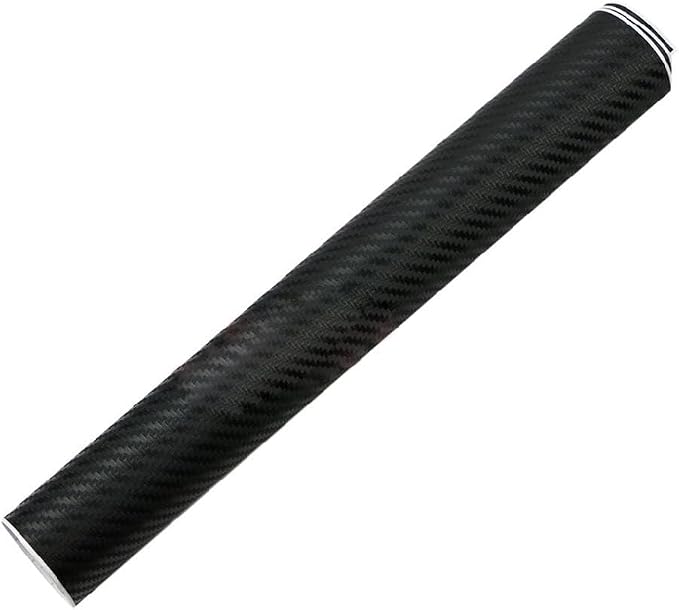
Raised carbon-fibre weave sheet; cut to size.

Leather-effect laminate, made in the UK; 15.6″ sheet.

Printed with your own photos; choose your MacBook model on the listing.
How Laptop Skins Compare to Alternatives
Laptop skins sit in a sweet spot between doing nothing (leaving your laptop bare and vulnerable) and going all-in with a hard case (adding bulk and weight). Here's how they stack up:
- vs Hard Cases: Skins add zero bulk. Hard cases add 2-4mm thickness and 100-200g weight. Skins protect against scratches better than cases protect against drops — but cases win on impact protection.
- vs Stickers: Individual stickers leave gaps, peel at the edges, and leave residue. A full skin is one seamless piece designed to fit perfectly.
- vs Doing Nothing: A bare laptop lid will accumulate micro-scratches within weeks. A skin costs a fraction of what it preserves in resale value.
Ready to find your perfect skin?
Browse hundreds of designs across all categories — from minimalist matte to vibrant anime.
Shop All Laptop SkinsFrequently Asked Questions
Are laptop skins easy to apply?
Yes. Most skins use a bubble-free adhesive that lets you reposition during application. The key is cleaning the surface thoroughly and working slowly from one edge to the other. First-time users typically achieve great results in 10-15 minutes.
Will a laptop skin fit my specific model?
If you buy a model-specific skin (e.g. "MacBook Pro 14 M4 2024"), the cut will be exact — including the Apple logo cutout, hinge gaps, and precise edge alignment. Universal skins are also available and fit a range of sizes.
Can I remove and reapply a laptop skin?
Most skins are designed for one-time application. While some premium 3M vinyls can be repositioned during the initial install, removing and reapplying days later is not recommended — the adhesive loses tack and alignment becomes difficult.
Will a skin trap heat in my laptop?
No. Laptop skins are applied to the lid and palm rest — not over ventilation grilles or exhaust ports. Modern laptops dissipate heat through the keyboard, hinge, and bottom vents, none of which are affected by a lid skin. The vinyl layer is too thin to act as an insulator.
How long does a quality laptop skin last?
A premium 3M vinyl skin typically lasts 2-4 years with normal use. The edges may show slight wear after heavy daily handling, but the main surface remains intact. Outdoor exposure to direct sunlight will accelerate fading on any vinyl product.
Do laptop skins work on textured laptop lids?
It depends on the texture. Smooth metal lids (MacBook, Dell XPS, HP Spectre) are ideal. Heavily textured or rubberised lids (some gaming laptops, ThinkPad soft-touch) may not allow full adhesion. Check the product description for compatibility notes.
Related: Ultimate Buying Guide · Skin vs Case Protection · How to Apply · Which Style Matches You?