The Ultimate Laptop Skin Buying Guide 2026
If you have ever stared at a wall of laptop skins and wondered which one actually lasts, which material is right for you, or whether you are about to waste money on something that peels off in a week — this guide is for you.
We have tested, reviewed, and compared dozens of laptop skins across every major brand sold in the UK. Here is everything you need to know before you buy.
The short version: buy for the physical lid and the stated model compatibility first; colour and finish come second. That one check prevents most disappointing purchases.
Size and fit: check this first
What Is a Laptop Skin — and Why Bother?
A laptop skin is a precision-cut vinyl decal that adheres to the lid (and sometimes the palm rest and trackpad) of your laptop. Unlike a hard case, it adds zero bulk. Unlike a sticker bomb, it covers the entire surface with a single, seamless design.
People buy laptop skins for three reasons:
- Protection — Guards against scratches, scuffs, and light wear without adding weight.
- Personalisation — Turns a generic silver rectangle into something that feels like yours.
- Resale value — Keeps the original finish pristine underneath. Peel it off and the laptop looks brand new.
If you are on the fence between a skin and a hard case, we have a full comparison here.
The Materials: Not All Vinyl Is Equal
The single most important factor in how your skin looks and lasts is the material. Here are the three main types sold in the UK market:
3M Vinyl (Premium)
3M is the industry standard for a reason. Their Di-NOC and Controltac films are used in automotive and architectural applications — these are the same materials that wrap entire cars. 3M vinyl offers excellent air-release channels (no bubbles), a lifespan of 3-5 years, and clean removal with zero residue.
Best for: Anyone who wants a skin that lasts. Worth the premium.
Cast Vinyl (Mid-Range)
Most mid-tier laptop skins use cast PVC vinyl. It is thinner than 3M, conforms well to curves, and typically lasts 1-3 years. Brands like MightySkins, Skinit, and Decalrus use cast vinyl. The print quality varies significantly between manufacturers — some are photo-realistic, others look blurry up close.
Best for: Design variety on a budget. You get more pattern choices at a lower price.
Calendered Vinyl (Budget)
The cheapest option. Calendered vinyl is thicker, stiffer, and more prone to shrinking over time — especially around heat vents. It can leave residue when removed. Found on no-name Amazon listings and ultra-budget eBay skins.
Best for: Short-term use, experimenting with a design before committing. Do not expect it to last beyond a year.
| Type | Typical life | Application | Removal |
|---|---|---|---|
| 3M (premium) | 3–5 years | Air-release channels, few bubbles | Clean, no residue |
| Cast (mid-range) | 1–3 years | Thin, conforms to curves | Usually clean |
| Calendered (budget) | Up to a year | Thicker and stiffer; can shrink near vents | May leave residue |
How to Measure Your Laptop for a Skin
The most common mistake first-time buyers make is ordering the wrong size. Laptop skins are not one-size-fits-all — they are cut to specific laptop models or screen-size ranges.
What you need to measure:
- Screen size (diagonal) — This is the number you see advertised (13.3", 14", 15.6", etc.). It determines which size bracket your skin falls into.
- Lid dimensions (width × height in mm) — For precision-cut skins, measure the exact flat surface of your laptop lid with a ruler or tape measure. Do not include the hinge or curved edges.
- Laptop model — If you are buying a model-specific skin (e.g. "MacBook Pro 14 M4"), the manufacturer has already done the measuring. Just match the model exactly.
Quick size reference:
- 12-13.3" — Ultrabooks, MacBook Air, Surface Laptop
- 14-15" — MacBook Pro, Dell XPS, HP Spectre
- 15.4-15.6" — Gaming laptops, Dell Inspiron, HP Pavilion
- 16-17.3" — Large gaming rigs, workstation laptops
Most universal skins on Amazon come in multiple size options. Always double-check your lid measurements against the product description before ordering.
Style Guide: Which Look Suits You?
We have organised laptop skins into six main style categories. Each has its own vibe, durability characteristics, and best-use scenario.
Minimalist & Matte
Solid colours, subtle textures, matte black or dark grey. These skins are practically invisible — they look like the laptop's original finish but with added scratch protection. Browse minimalist skins →
Carbon Fibre & Textured
3D carbon fibre weave patterns are the most popular laptop skin style worldwide. They add grip, hide fingerprints, and give any laptop a premium technical look. If you want the carbon fibre vs matte breakdown, we have that too →
Marble & Stone
White marble, black marble, rose gold marble — marble laptop skins have exploded in popularity over the last two years. They look expensive, photograph beautifully, and pair well with Apple's silver and gold finishes. Our full marble laptop skin guide →
Custom & Patterned
This is where things get interesting. Geometric patterns, watercolour washes, galaxy prints, mandala designs, wood grain, holographic rainbows — if you want something that nobody else has, this is your category. Browse custom & patterned skins →
Gaming & Bold
RGB-inspired designs, camo patterns, aggressive geometric lines. Gaming laptop skins are loud and unapologetic. Brands like Decalrus and MightySkins dominate this space with officially licensed designs from major game franchises. Browse gaming laptop skins →
Anime & Pop Culture
Anime laptop skins are one of the fastest-growing subcategories. From subtle character art to full-lid manga panels, there is a massive community around anime laptop customisation. Browse anime skins → and read how to make your anime skin stand out →
One example per style

Plain beige universal sheet; trim to fit 12–15.6″ lids.
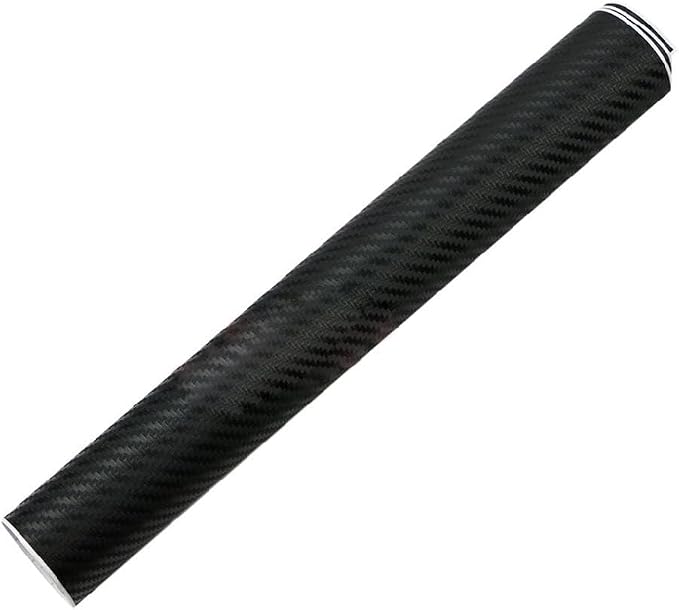
Raised carbon-fibre weave sheet; cut to size.

Grey marble with gold veins; 38 × 27 cm, trim to fit.

Neon city anime art; universal 12–15.6″ sheet.
Application: Get It Right First Time
A badly applied skin looks worse than no skin at all. Bubbles, misalignment, and trapped dust are the three enemies. Here is the short version:
- Clean the lid — Isopropyl alcohol or the included wipe. Any dust particle will create a visible bump.
- Align before sticking — Use the hinge edge or logo cutout as your reference point. Do not peel the entire backing off at once.
- Hinge method — Peel 2-3 cm of backing, align that edge, tack it down, then slowly peel the rest while smoothing with a credit card wrapped in a microfibre cloth.
- Work from centre outward — Push air bubbles to the edges. Most premium vinyl has air-release channels that make this easy.
For the full step-by-step process with photos, read our complete application guide →
Maintenance & Longevity
A well-applied premium skin should last 2-4 years. Here is how to maximise its lifespan:
When it is time to remove the skin, do it slowly at room temperature. Cold vinyl is brittle and can leave adhesive behind. Safe removal guide →
MacBook Owners: Read This
Apple's aluminium unibody is the easiest surface to skin — it is perfectly flat with no vents or ridges on the lid. MacBook skins have the highest success rate for first-time applicants. Our dedicated MacBook skin guide for professionals →
Gaming Laptops: Special Considerations
Gaming laptops are trickier. They often have textured lids, aggressive angles, RGB logos, and rear exhaust vents. Look for skins specifically cut for your model (ASUS ROG, MSI, Razer Blade, Lenovo Legion) rather than universal sizes. Best gaming laptop wraps of 2026 →
The Bottom Line
If you take one thing from this guide, let it be this: spend a little more on the material. The difference between a £5 calendered vinyl skin and a £15 cast or 3M vinyl skin is night and day — in looks, in application, and in how long it lasts.
Your laptop is something you look at every single day. A good skin makes it feel new again. A bad one makes you wish you had never bothered.
Quick Links: Start Shopping
- Custom & Patterned Laptop Skins — Marble, galaxy, mandala, holographic, and more